Mirsad turns any Amazon search page into a full research table: prices, BSR, local fees, net revenue and sales estimates for every product, without opening a single tab.
Free during launch. Paid plans come later, and early users get a discount.
No spreadsheets, no copy-paste, no 60 open tabs.
Go to Amazon.ae, Amazon.sa or Amazon.eg and search for any product idea, like you normally would.
Mirsad reads every product on the page and opens a full research table right on top of Amazon.
Sort, filter and compare. Pick the products worth chasing and export them to Excel or Google Sheets.
Built for the way Gulf and Egyptian Amazon pages actually look, not adapted from Amazon.com.
Price, rating, reviews, Best Sellers Rank, brand, FBA or FBM, number of sellers, dimensions and weight. Summary cards show the averages for the whole search, so you can size up a niche at a glance.
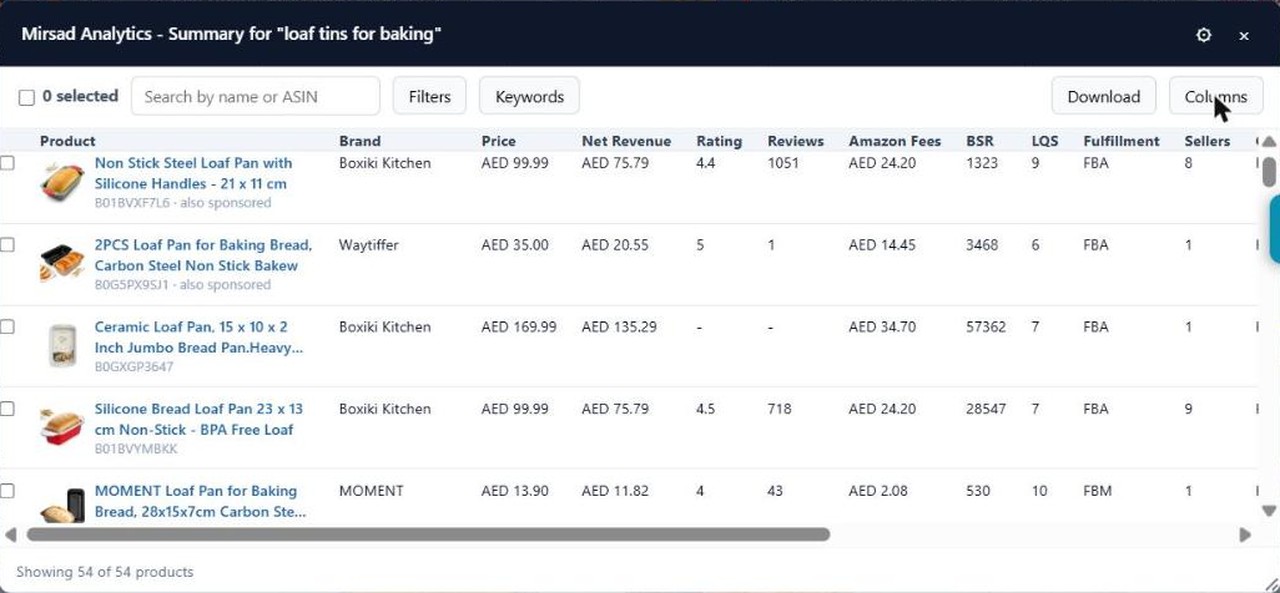 Real screenshot · amazon.ae
Mirsad works out the referral fee and FBA fulfilment fee for each product from Amazon's published fee tables for each marketplace, then shows what's left, in AED, SAR or EGP.
Monthly units, daily units and monthly revenue, estimated from each product's real BSR. Always shown as a range, never a fake exact number, because nobody has public sales data for these marketplaces yet.
A simple 1 to 10 score for every listing, based on what's actually on the page: images, title length, bullet points, A+ content and video.
Mirsad pulls the most-used words from titles, bullet points and descriptions across the search results, with filler words removed.
Select the rows you care about and export them, or everything visible, to a clean CSV that opens straight in Excel or Google Sheets, with numbers ready to sort and add up.
Mirsad shows each product's Amazon size tier from its weight, so you can spot products that will be cheap or expensive to ship through FBA.
Most research tools are made for Amazon.com and loosely adapted for the Middle East. Mirsad was designed around local currencies, local fee tables and the way these search pages are really built.
Run entirely in your browser. Nothing you type is sent anywhere unless you ask us to email you a result.
The core product. How to install it and get the research panel on Amazon.
See details →Product cost, shipping and ads against each marketplace's real referral and FBA fees.
Open tool →Turn any Amazon listing or store link into a QR code for packaging, print or in-store use.
Open tool →Five standard Amazon link formats: brand, ASIN and keyword search links, plus add-to-cart links.
Open tool →Check your title, bullets and description against Amazon's real character limits.
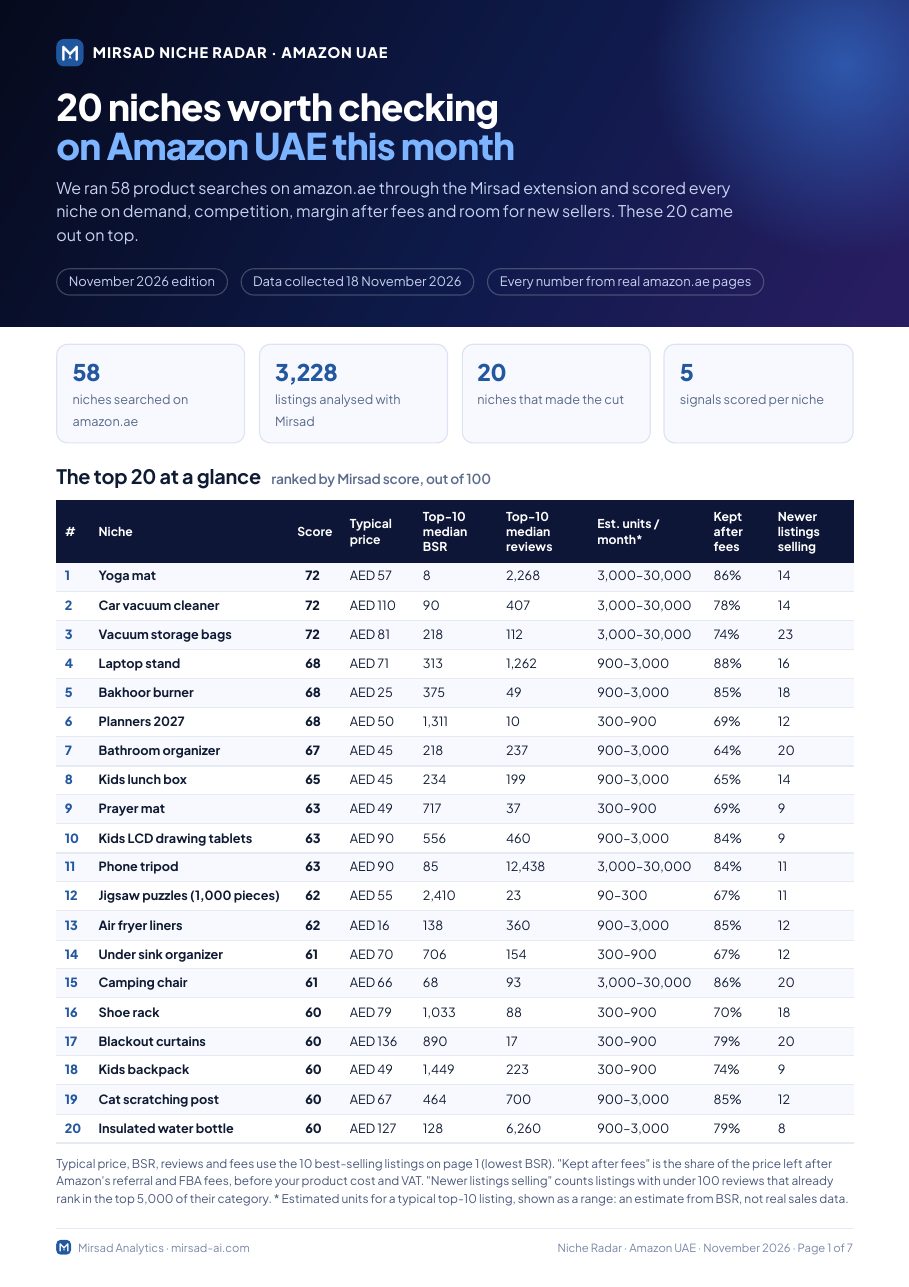
Open tool →Price and review alerts on WhatsApp are next. Get Mirsad updates by email to hear first.
Get updates →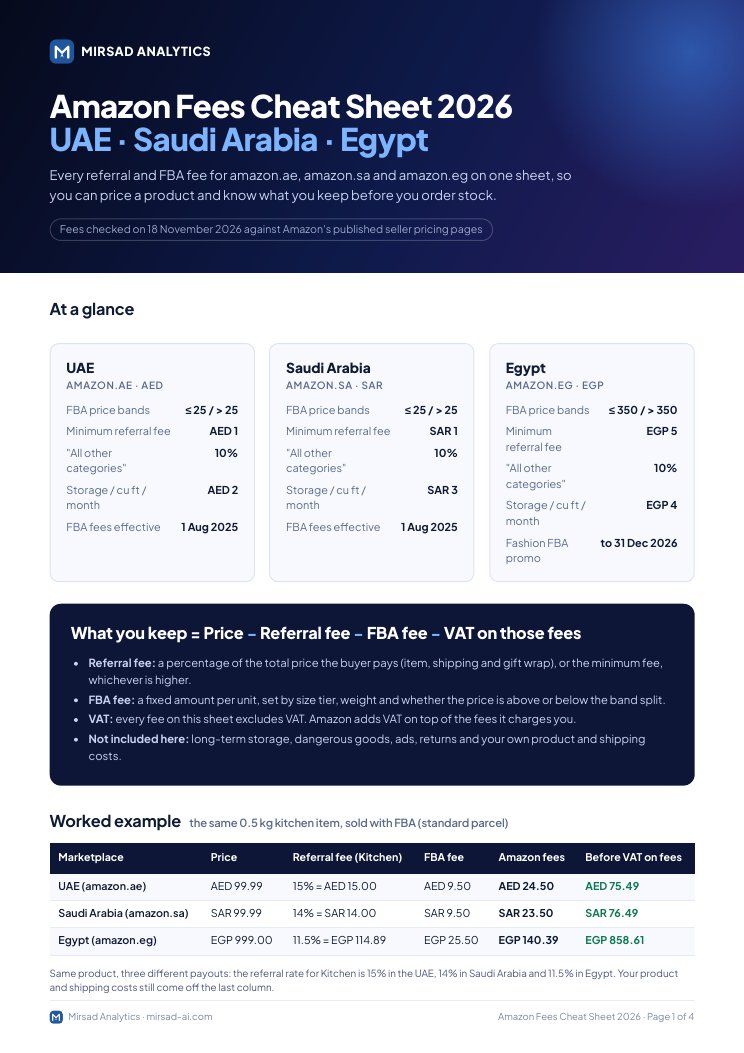
Read live from the page you're viewing, using your own browsing session.
Worked out from BSR and always shown as a range, so you never mistake a guess for a fact.
Find your first product in the UAE, Saudi or Egyptian market.
Check a new niche properly before you order stock.
Size up competitors and the gaps in their listings.
Run fast, repeatable product research for clients.
Amazon.ae (UAE), Amazon.sa (Saudi Arabia) and Amazon.eg (Egypt). The extension and fee calculators are built and checked against all three.
No, and we say so on the product. Monthly units and revenue are estimates based on BSR and always shown as a range. Price, rating, reviews, BSR, category and fees are real data from the page.
Each marketplace's own published Amazon fee schedule, checked separately for the UAE, Saudi Arabia and Egypt. Always confirm final fees in your Seller Central account.
No. It runs in your browser, reads the Amazon pages you're already viewing, and doesn't need an account or your Amazon login.
It’s live on the Chrome Web Store. Click Add to Chrome, then open any amazon.ae, amazon.sa or amazon.eg search page and click the Mirsad button.
Install the Mirsad Chrome extension from the Chrome Web Store. It’s free during launch, and early users get a discount when paid plans arrive.
Not ready to install? Get Mirsad updates and the monthly Niche Radar by email.